A packing line can show that cartons are moving without showing where work is building up. Integrating packaging machinery with a WMS can connect packing events to order and container records, making it easier to see which carton is being processed and how it relates to its container code.
That visibility matters when packing stages, conveyors and warehouse workflows need to operate as one process. Linking carton barcode or 2D-code details with container information can support traceability, while connected status data can help identify queues, equipment waits and constraints on output.
This article explains how data flows between packaging machinery and a warehouse management system (WMS), how carton and container codes can be linked, and where integration can become complex. It also covers how to connect process stages while allowing for future changes and operational needs.
Key Takeaways
- See how coordinated machinery, power, safety, I/O and communications can make packing stages work as a connected process.
- Understand why integration complexity can slow automation, and how clear interfaces and workflow planning help manage it.
- Learn what to consider when scaling a connected workflow, including where waits or downstream capacity limit output.
- Identify the main factors that shape integration costs and where Pick & Pack De Palletisers may fit into a packaging line.
Integrated Case Packing And Palletising Lines: Is It Time To Connect Your Packing Processes?
A connected line links physical packaging operations with order and shipment data. The benefits are clearest when carton identity, machine status and downstream handling stay aligned.
Coordinating Machinery and System Communications
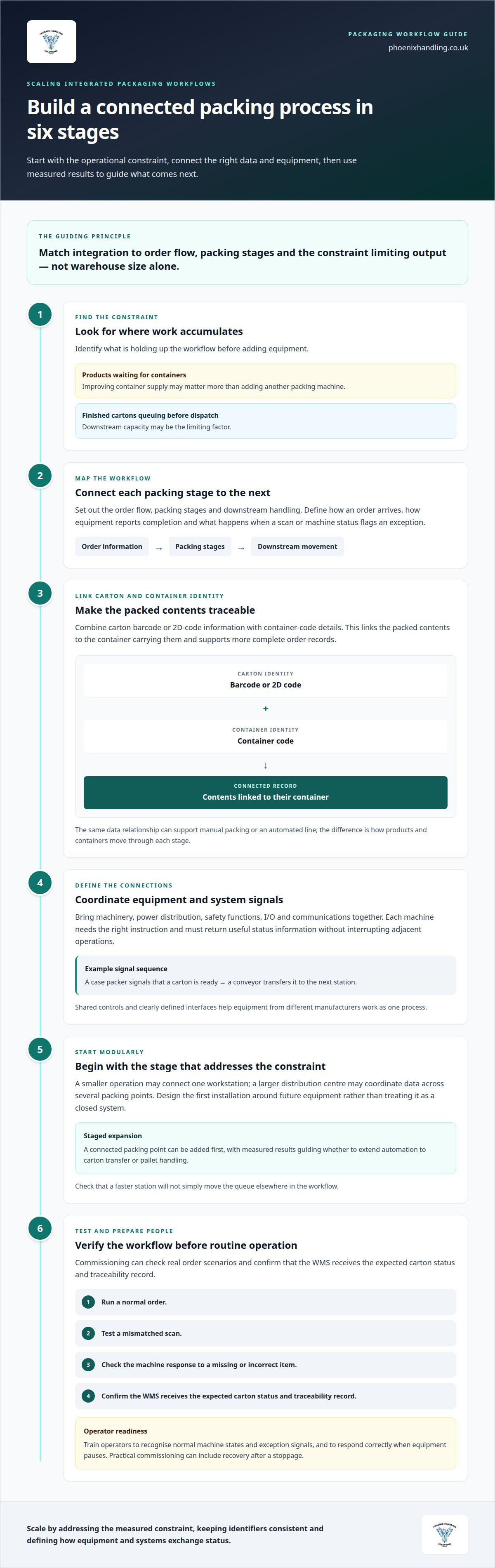
Coordination brings machinery, power distribution, safety functions, I/O and system communications together across the line. Each machine needs to receive the right instruction and return useful status information without interrupting adjacent operations. For example, a case packer can signal that a carton is ready, and a conveyor can transfer it to the next station. Shared controls and clearly defined signals help the equipment work as one process.
Connecting Packaging Machinery with Warehouse Systems
Warehouse integration exchanges order and carton data between packaging equipment, a WMS, warehouse control systems and transport systems. This connects packing instructions to the item or order being processed, rather than treating each carton as an untracked unit. A barcode or RFID scan can retrieve order details, allowing the machine to apply the relevant packing or labelling instruction. The resulting carton identity can support tracking in transit and more efficient dispatch.
Packaging Vendors and System Integrators
Machinery suppliers provide equipment and its operating controls, while system integrators coordinate interfaces between machines and warehouse technologies. This distinction matters when a line combines equipment from different manufacturers. During commissioning, the team can test a normal order, a mismatched scan, and the machine’s response to a missing or incorrect item. It can then verify that the WMS receives the expected carton status and traceability record before routine operations begin.
UK Standards and Integration Costs
UK installations must meet applicable machinery, electrical and workplace safety requirements, assessed against the equipment and workflow. Integration costs depend on existing controls, required interfaces, machine condition, line changes and commissioning work. A straightforward data connection differs from coordinating machinery, power and safety across several stations. The project scope should therefore describe both system links and physical changes to the line.
Integration complexity as a barrier to automation
Integration can delay warehouse automation because equipment, controls and logistics software all need to work together. A line might include a robot, conveyor, packing station and warehouse system, each with different operating signals. If an interface fails, cartons may queue or status information may become inconsistent. Planning the connections as one workflow helps identify dependencies before automated equipment enters routine use.
Working with one automation partner can reduce the coordination needed between suppliers by aligning equipment, interfaces and system communications. This is useful when a project combines machines from different manufacturers or connects a new packing stage to existing warehouse controls. The integration plan can define how an order arrives, how equipment reports completion, and what happens when a scan or machine status flags an exception.
Robotic pick-and-place automation can be introduced earlier in the packing process when repetitive product handling is a constraint. For example, a robot can transfer selected items to a packing position while the surrounding process manages carton supply and downstream movement. Suitability depends on the product, how it is presented and the handling pattern required. Integrating the robot with the wider workflow helps prevent a faster station from simply moving the queue elsewhere.
Worker training is also part of automation planning. Operators need to understand normal machine states, exception signals and the correct response when equipment pauses. A practical commissioning programme can use real order scenarios, including a routine cycle and a recovery after a stoppage. Clear procedures help staff work consistently with automated equipment and identify when a fault needs technical attention. For lines where pallet transfer or end-of-line handling is a constraint, automated handling equipment can form part of the wider workflow.
Scaling integrated packaging workflows
Choose integration options based on order flow, packing stages and the constraint limiting output, not warehouse size alone. A smaller operation may benefit from connecting one workstation, while a larger distribution centre may need coordinated data across several packing points. In either case, the design should match demand and leave a practical route for adding equipment.
Start by identifying where work accumulates. If products wait for containers, improving container supply may matter more than adding another packing machine. If finished cartons queue before dispatch, downstream capacity may be the constraint. A retail operation, for example, can begin with one packing stage and plan its layout and interfaces around future equipment, rather than treating the first installation as a closed system.
At a workstation, carton barcode or 2D-code information can be combined with container-code details. This links the packed contents to the container carrying them and supports more complete order records. A manual packing process can use the same data relationship as an automated line; the difference is how products and containers move through each stage. Consistent identifiers make later expansion easier to manage.
Modular integration lets businesses choose options that suit changing supply and demand patterns. The first installation can address a specific operational constraint, with its measured results guiding further automation. For instance, a connected packing point could be added before extending automation to carton transfer or pallet handling. This staged approach ties each change to a clear workflow need while keeping new machinery coordinated with existing processes.
How much does packaging machinery and WMS integration typically cost in the UK?
There is no single UK price for integrating packaging machinery with a WMS. The cost depends on the project scope and is provided after a quote request. Equipment, existing controls, software interfaces and commissioning requirements all affect the scope. Connecting one established packing station differs from a project involving new machinery, conveyor changes and links across warehouse systems.
Existing infrastructure is a key cost factor. A machine with compatible controls, for example, may need only a defined data interface, while older equipment could require additional control work. WMS configuration matters too: the project must map relevant order, carton and status data and define how exceptions are recorded. Physical layout changes, installation access and production downtime can also affect the work involved.
- Equipment scope: the number and type of packing stages included, such as carton handling or pallet preparation.
- System interfaces: the data exchanged between machinery, the WMS and any warehouse control system.
- Line modifications: changes to conveyors, transfers or existing equipment needed for the intended workflow.
- Commissioning: testing routine orders, exception handling and the return of machine status data.
A useful project scope separates machinery supply from integration work. It should describe the operating sequence, data exchanged, physical changes and acceptance tests. If a carton barcode must trigger a packing instruction, for instance, the scope should cover the scan, the machine’s response and the recorded completion status. This makes proposals easier to compare by function, not just headline price.
Define the operational constraint first, such as waiting cartons or limited downstream capacity. That helps align the equipment and interface requirements with the intended outcome. To discuss the machinery and line requirements for your operation, request a packaging line discussion.
Phoenix Handling Solutions Limited: Pick & Pack De Palletisers
Phoenix Handling Solutions supplies Pick & Pack De Palletisers for operations that move products from pallet loads into a packing workflow. They can suit sites looking to reduce manual product handling before carton packing, particularly when product flow needs to be coordinated with packing and warehouse processes.
The wider line may also include Pallet Wrapping Machines, Strapping Machines or Stretch Hooders, depending on how finished loads need to be secured. Selection depends on the products handled, the existing layout and the workflow constraint. These machines form physical stages in the packaging process, so order data and system interfaces should be planned around the operation as a whole.
Contact Phoenix Handling Solutions Limited to discuss the equipment requirements and intended workflow.
Plan the next stage of your packaging line
Use the next project decision to connect a defined operational need with the equipment and information flow around it. Integrating packaging machinery with a WMS is most useful when order data and machine activity support a clear workflow objective, rather than adding connectivity without a practical purpose. A phased plan can also preserve room for later changes as product handling and dispatch requirements develop.
Consider packaging equipment as part of the complete line. Pallet Wrapping Machines, Strapping Machines and Stretch Hooders each address different load-securing requirements, depending on the operation and finished product. The right configuration depends on how these stages fit the existing process and planned system connections.
For a discussion of equipment options and your packaging workflow, contact Phoenix Handling Solutions Limited. A considered conversation can help you define the next step for your line with clarity.
Frequently Asked Questions
How Does Connecting Your Packing Stages Improve Visibility?
Connecting packing stages gives teams a clearer view of work as it moves through the line. A supervisor, for example, can identify whether a delay occurs before packing, at a machine or during transfer to dispatch. This helps distinguish a local equipment issue from a wider flow constraint. Consistent status records also make it easier to investigate order queries without relying solely on operator recollection.
What is Packaging Integration with Machinery?
Packaging integration connects machines and controls so they work together in a production or fulfilment process. It can cover physical transfers, control signals and production data. For example, a case erector may need to supply cartons in step with a packing station’s demand. The integration scope depends on the machines involved and how the workflow needs to respond to production changes.
How does WMS integration with packaging machinery work?
A WMS integration gives packaging equipment access to relevant warehouse instructions and lets the system receive operational updates. An order can determine the required packing activity, while a machine or connected scanner reports progress. A practical design also defines what happens when an instruction cannot be completed, such as sending the exception for review. This helps prevent incomplete or unusual orders from being treated as routine output.
What data and communication protocols do packaging machines exchange with a WMS?
Data commonly includes order or carton identifiers, packing instructions, processing status and exception information. The communication method depends on the WMS, machine controls and interface design, so no single protocol suits every installation. A barcode scan, for example, may identify a carton while a machine status message records that processing is complete. Agree the data fields and error responses before implementation.
What steps do professionals take to integrate packaging machinery with a WMS?
The project team defines the workflow, maps data fields, sets up machine and software interfaces, then tests representative operating conditions. Testing should cover normal processing, incorrect or incomplete instructions, communication interruptions and recovery. The team can then confirm that machine responses and WMS records match the intended process. Documented configuration and operator procedures support a consistent handover and give maintenance teams a useful reference after commissioning.
What are the common risks and challenges when integrating packaging machinery with a WMS?
Common challenges include incompatible controls, unclear data ownership, incomplete exception handling and changes to existing workflows. A carton may be physically processed while its system status remains unresolved, leaving dispatch teams uncertain. Older equipment can also require additional interface work. Manage these risks by defining expected responses, responsibilities and recovery procedures, then testing them against realistic production scenarios before routine use.